Why Switching Between Llama, Mistral, and Qwen Models Wrecks Your Disk Space
You pulled Llama 3.1 8B to try it out. Then you heard Mistral's newer release was better at following instructions, so you pulled that too. Then a coworker mentioned Qwen2.5 was surprisingly strong at code, so now you have that as well. None of these felt like a big decision at the time — each one is just a single `ollama pull` or a download button in LM Studio. Three weeks later you check disk usage and there's 60-90GB sitting in model caches you mostly don't use anymore.
This isn't a one-off mistake. It's the natural result of how local LLM evaluation actually works: you don't know which model family and which size will suit your use case until you've run a few side by side, and every one you try leaves its full weight file behind, indefinitely, with no built-in prompt to clean up. Unlike a browser cache that evicts old entries on its own, a model file just sits there until you explicitly remove it.
What a model file actually weighs
The number that matters is parameter count times quantization, not the marketing name. Most people running models locally use GGUF format at 4-bit quantization (commonly labeled Q4_K_M), which is the practical default in Ollama and LM Studio because it keeps quality close to the full-precision model at a fraction of the size. Rough, real-world sizes at Q4_K_M, consistent across the Llama, Mistral, and Qwen families since they all scale by parameter count in roughly the same way:
- 7B–8B parameter models (Llama 3.1 8B, Mistral 7B, Qwen2.5 7B) — about 4.5–5.5GB each.
- 13B–14B parameter models (Qwen2.5 14B, older Llama 2 13B) — about 7–8GB each.
- 32B–34B parameter models (Qwen2.5 32B, Mistral's larger dense releases, Yi 34B) — about 18–20GB each.
- 70B+ parameter models — 38–42GB at Q4, and that's before anyone reaches for a higher-quality quant.
Quantization levels multiply the same model several times over
Parameter count is only half the equation. The quantization scheme applied to those parameters changes the file size by a meaningful amount, and it's common to keep more than one level of the same model while you decide which tradeoff is worth it. For an 8B model, roughly: Q4_0 (an older, simpler 4-bit scheme) lands around 4.4GB, Q4_K_M (the modern default, better quality per bit) is closer to 4.9GB, Q5_K_M pushes to about 5.7GB, Q6_K to roughly 6.6GB, and Q8_0 — essentially lossless relative to the original weights — is close to 8.5GB. None of these is wrong to have; the problem is having three or four of them for the same model at once because you never went back and deleted the ones you weren't using.
This effect compounds badly with mixture-of-experts architectures. Mistral's Mixtral 8x7B, for instance, has far more total parameters than a dense 7B model despite only activating a fraction of them per token — at Q4_K_M it's roughly 26GB, and the larger Mixtral 8x22B variant is well over 80GB at the same quantization. If you're comparing Mistral's dense 7B release against its MoE releases, you're not comparing similarly sized files at all, even though both get casually referred to as "a Mistral model."
A per-family cheat sheet for what you're actually downloading
It helps to know the shape of each family before you start pulling models, so you're not surprised by the running total. This isn't exhaustive, but it covers what most people actually try when comparing the three:
- Llama family — Llama 3.2 ships small variants (1B, 3B) specifically meant for lightweight or on-device use, around 0.8–2GB at Q4; Llama 3.1 8B is the common mid-size pick at ~4.9GB; Llama 3.1 70B is the large flagship at ~40GB and is usually the single biggest file anyone downloads in a comparison.
- Mistral family — the original dense 7B release is ~4.4GB; Mixtral 8x7B (MoE) is ~26GB; Mixtral 8x22B (MoE) is 80GB+; Mistral's smaller instruct-tuned releases stay in the 4-5GB range like other 7B dense models.
- Qwen family — Qwen2.5 has an unusually wide size range for one family, from 0.5B (a few hundred MB) up through 1.5B, 3B, 7B, 14B, 32B, and 72B; the Qwen2.5-Coder variants mirror these same sizes but are a separate download from the general-purpose Qwen2.5 models, so trying both the base and Coder variant at 14B alone is already two ~8GB files.
Why comparisons snowball past 100GB
A single 8B model at 5GB isn't the problem. The problem is that comparing model families means keeping several of them around at once, and each one also tends to exist in more than one quantization while you're deciding whether the quality tradeoff is worth it. Walk through a realistic evaluation: you pull Llama 3.1 8B, Mistral 7B, and Qwen2.5 7B at Q4_K_M to get a baseline (about 15GB combined), then decide the responses feel slightly off and pull Q8_0 versions of the two you liked best to check whether the smaller quant was actually losing quality (another ~17GB), then someone mentions Qwen2.5-Coder is worth trying for a specific project so you add that at 14B (another 8GB), and finally you want to see what a genuinely large model feels like so you pull Llama 3.1 70B once, out of curiosity, and never touch it again (40GB on its own).
Add that up and you're past 80GB from a perfectly reasonable, unhurried evaluation process — no single step felt reckless. Ollama makes the accounting harder in a subtle way: it stores models as content-addressed blobs under `~/.ollama/models/blobs`, with a separate manifest per tag under `~/.ollama/models/manifests`. Pulling `llama3.1:8b` and `llama3.1:8b-instruct-q8_0` looks like one model with two tags in `ollama list`, but they're two distinct multi-gigabyte blobs on disk, and the tag names alone don't make the size difference obvious.
Finding what you actually have
Before deleting anything, get an honest inventory. If you're using Ollama:
- `ollama list` — shows every model tag currently pulled, with its reported size, and roughly when it was last modified.
- `du -sh ~/.ollama/models` — total size of the whole model store, blobs included.
- `du -sh ~/.ollama/models/blobs/* | sort -rh | head -20` — shows which individual blob is largest, useful when manifests don't make it obvious which tag maps to which file.
- `ollama ps` — shows which models are currently loaded into memory, a decent proxy for which ones you actually use in a given session versus which ones just sit on disk.
LM Studio keeps its own separate copies
If you're also running LM Studio alongside Ollama — a common combination, since LM Studio's model browser is a faster way to try new GGUF releases and preview quantization options before committing to a download — its downloads live in a completely separate location, typically `~/.cache/lm-studio/models` or a folder you chose during setup, organized by publisher and model name (for example, a Qwen2.5 model appears under a folder like `Qwen/Qwen2.5-14B-Instruct-GGUF`). It does not share files with Ollama's blob store, so the same Qwen2.5 14B model pulled through both tools exists twice on your disk at full size, with no deduplication between them.
Running `du -sh ~/.cache/lm-studio/models/*` will show you the same pattern of publisher/model folders piling up as your Ollama manifests. It's worth checking both stores together when doing an audit, since it's easy to forget you have the same model twice under two different tools — the folder names won't look identical even when the underlying weights are.
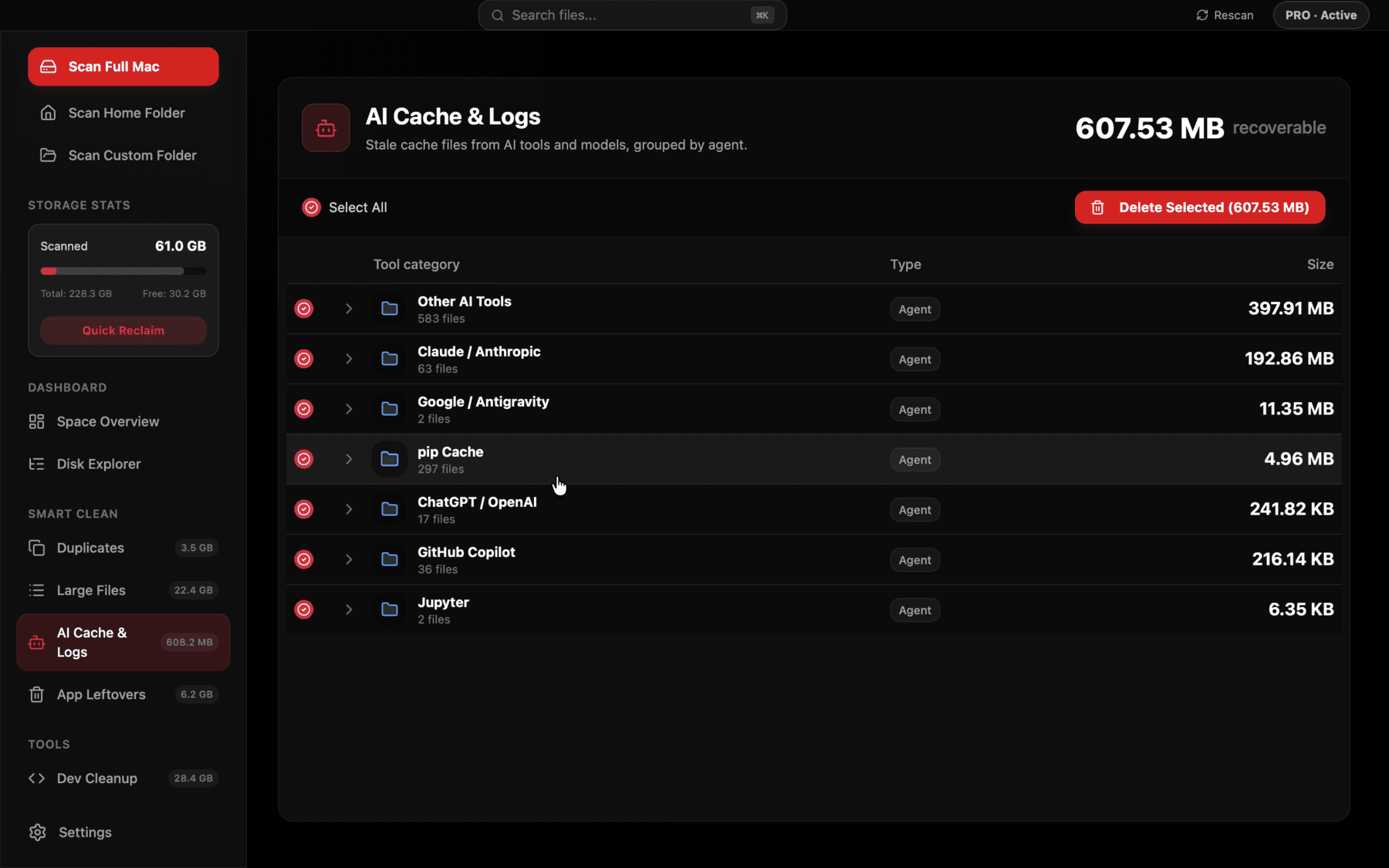
Reclaim groups Ollama blobs and LM Studio model folders separately, by tool, so you can see which specific model tags are worth keeping before deleting anything.
A step-by-step cleanup walkthrough
Here's a concrete process, rather than a vague rule: first, run `ollama list` and `du -sh ~/.cache/lm-studio/models/*` side by side and write down every model tag with its size. Second, cross out any tag you haven't used in the last two to three weeks and had no specific ongoing reason to keep — a one-off comparison model almost always falls here. Third, for the models you're keeping, check whether you have more than one quantization of the same model; unless you're actively benchmarking quality differences, keep the one you use day to day and remove the rest. Fourth, run `ollama rm <model:tag>` for anything on Ollama's side, and delete the corresponding publisher/model folder directly for anything in LM Studio's models directory.
The safe rule of thumb after that first pass: keep one quantization per model you're actively using, delete every model tag you pulled for a one-off comparison and haven't opened in weeks, and never keep two quant levels of the same model unless you have a specific, ongoing reason to A/B them. `ollama rm <model:tag>` removes a tag and, if no other tag references the same blob, frees that blob's space immediately. For LM Studio, deleting is just removing the model's folder from its models directory — there's no hidden reference-counting, so it's safe to delete directly.
It's worth checking before you delete, though, since Ollama's content-addressing means two tags can share an underlying blob (for instance, a base tag and its `-latest` alias) — `ollama rm` handles this correctly on its own, but manually deleting files under `blobs/` without going through the CLI can leave a manifest pointing at a file that no longer exists, which shows up later as a confusing "model not found" error rather than a clean failure.
Where Reclaim fits in
This is exactly the kind of bloat that's easy to create by accident and tedious to audit by hand across two or three different tools, especially once you're several months into casually trying new releases as they come out. Reclaim's AI Cache & Logs view scans for Ollama's blob store and LM Studio's model directories specifically, shows each model's real size next to when it was last used, and lets you bulk-select the ones you're done comparing — everything still goes to Trash first, so a model you decide you need again next week isn't gone for good, just staged for removal until you confirm it.
Frequently asked questions
Why does the same model take up different amounts of space in Ollama versus LM Studio?
They don't share a model store. Even the identical GGUF weights, pulled once through Ollama and once through LM Studio, exist as two separate files on disk, each at full size.
Is a Q8 quantization actually worth the extra disk space over Q4_K_M?
For most day-to-day use, Q4_K_M is close enough in quality that the difference is hard to notice outside of narrow benchmarks — keeping Q8 as a permanent second copy is rarely worth roughly doubling that model's footprint.
How much disk space does a typical local LLM comparison setup use?
Comparing three 7-8B models across two families with one extra quant each commonly lands between 40-70GB, and that's before adding a single larger 32B+ or 70B model to the mix, which alone can add another 20-40GB.
Does deleting an Ollama model with ollama rm actually free the disk space?
Yes, as long as no other tag references the same underlying blob — Ollama's CLI checks this correctly before removing the file, unlike manually deleting from the blobs folder.
Can I move my Ollama or LM Studio model store to an external drive?
Yes — Ollama respects the OLLAMA_MODELS environment variable to relocate its store, and LM Studio lets you choose the models directory in its settings, which is worth doing if you regularly keep many large models around.
Why is Mixtral so much bigger than a regular 7B Mistral model?
Mixtral is a mixture-of-experts architecture with far more total parameters than a dense 7B model, even though only a fraction activate per token — that's why Mixtral 8x7B is around 26GB at Q4 versus roughly 4.4GB for Mistral's dense 7B release.
See exactly what’s using your disk space.