Python __pycache__, venv, and conda: The Hidden Storage Cost of Every Project
Python has a reputation as a lightweight language, but the storage footprint of a typical Python developer's Mac tells a different story. Between per-project virtual environments, compiled bytecode caches scattered through every package folder, and a growing conda or pip package cache, it's common to find tens of gigabytes spread across a Python setup that no single tool ever surfaces in one place.
Unlike node_modules, which most JavaScript developers already know to expect, Python's storage cost is split across three separate mechanisms that behave differently and live in different places — which is part of why it goes unnoticed for so long.
It also doesn't help that Python's tooling ecosystem itself is fragmented: venv, virtualenv, pipenv, poetry, and conda all solve roughly the same isolation problem in slightly different ways, each with its own default location and its own cleanup command. A developer who's used more than one of these over the years — which is most Python developers — ends up with leftover environments and caches from tools they no longer even use day to day.
__pycache__: small individually, everywhere collectively
Every time Python imports a module, it compiles the source to bytecode and caches it in a __pycache__ folder sitting right next to the source file, as .pyc files. A single __pycache__ folder is usually tiny — a few dozen kilobytes to a couple of megabytes — but they exist in every package directory of every virtual environment and every project you've run, which means a typical Python-heavy Mac can have thousands of these folders scattered across the filesystem.
Finding and clearing them is one command: find . -type d -name "__pycache__" -exec rm -rf {} + run from a project root removes every __pycache__ folder underneath it. It's entirely safe — Python regenerates these automatically the next time it imports the relevant modules, and deleting them never affects your actual source files.
To see the scale across your whole disk rather than one project, find ~ -type d -name "__pycache__" -exec du -ch {} + 2>/dev/null | tail -1 gives you a single combined total. Individually the number per project is rarely dramatic — often under 50MB even for a large codebase — but across years of virtual environments, each with __pycache__ folders for every installed package's own source files, the combined total across a whole Mac can still reach a gigabyte or more of pure clutter.
Virtual environments: small until you have dozens of them
A venv (created with python -m venv .venv or virtualenv) copies or links a Python interpreter and installs every dependency your project needs into an isolated folder, typically named .venv or venv sitting inside the project directory itself, though some developers centralize theirs under ~/.virtualenvs. A single venv for a data science project with numpy, pandas, and a couple of ML libraries can easily reach 500MB–2GB, since scientific Python packages bundle substantial compiled binary code.
The accumulation problem is the same one node_modules has: every project gets its own venv, none of them share dependencies with each other, and old ones for abandoned projects rarely get deleted since there's no natural prompt to do it. find ~ -type d -name ".venv" -exec du -sh {} + (adjust the name if you use venv, env, or a different convention) surfaces every one on disk with its size.
Because venv naming isn't standardized the way node_modules is, a single find command often won't catch everything — some developers use .venv, others venv, others env, and poetry defaults to storing environments centrally under ~/Library/Caches/pypoetry/virtualenvs/ rather than inside the project at all. A thorough check means running the find command with each naming convention, or separately checking poetry env list --full-path inside any project that uses Poetry, to make sure you're not missing environments living outside your project folders.
conda environments: the same idea, usually bigger
If you use conda or miniconda instead of (or alongside) venv, environments live centrally under ~/miniconda3/envs/ or ~/anaconda3/envs/ rather than inside each project folder. They tend to run larger than venvs because conda environments often include entire scientific computing stacks with their own bundled compiled libraries rather than relying on system libraries.
du -sh ~/miniconda3/envs/* (or the equivalent anaconda3 path) sizes each environment individually. conda env list shows which ones conda actually knows about; it's common to find environments in that list you created for a single tutorial or course and never removed. conda env remove -n environment-name deletes a specific one cleanly.
Cleaning it up in one place instead of three
Because venvs, conda environments, __pycache__ folders, and package caches use different commands and live in different locations, keeping track of all of them manually means remembering several separate cleanup routines and re-running them periodically. Reclaim's Dev Cleanup view detects Python virtual environments and __pycache__ folders across your whole disk alongside your other dev caches — node_modules, Xcode's DerivedData, Rust's target/ — so you're clearing all of it from one grouped list instead of context-switching between pip, conda, and find commands.
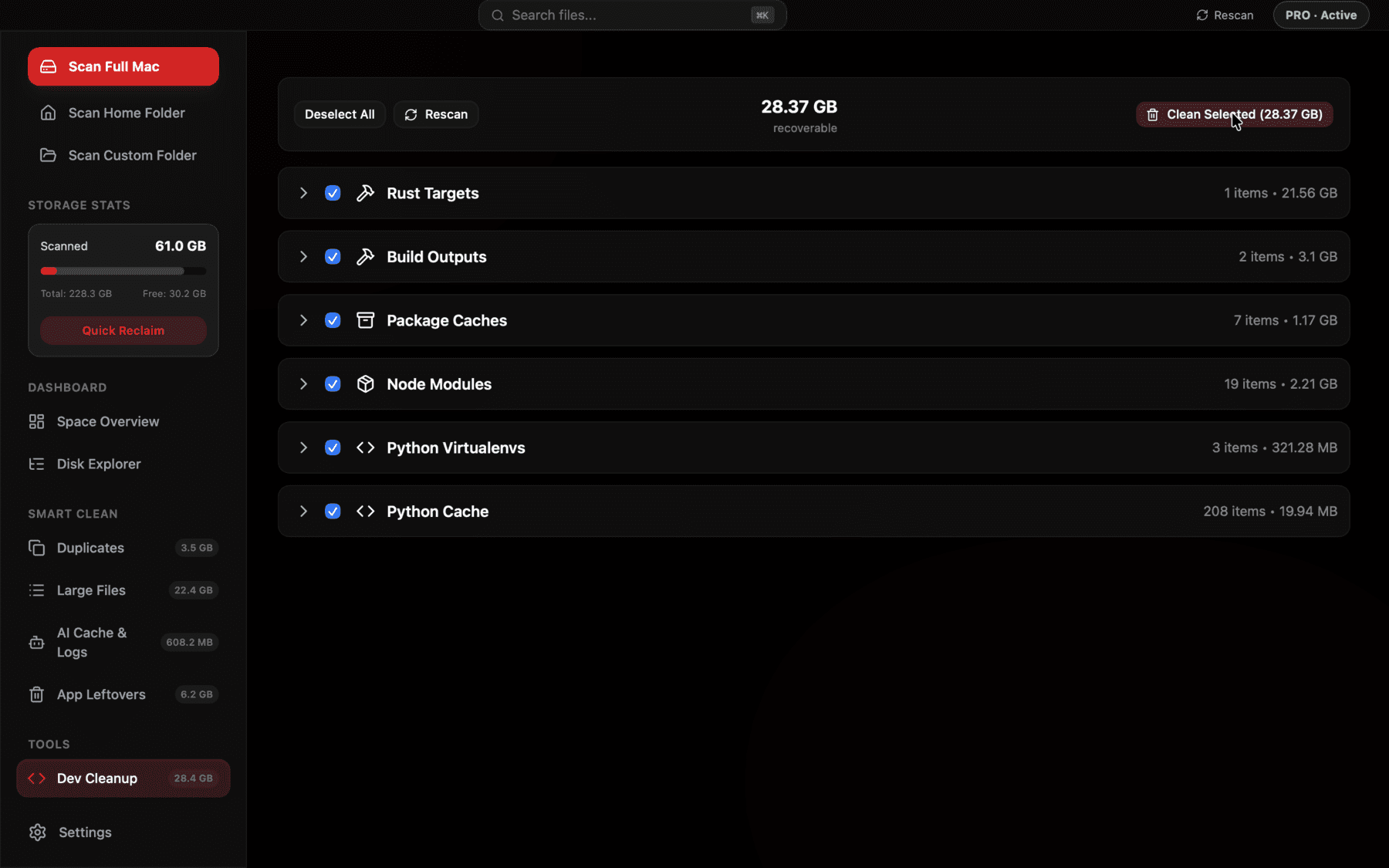
Python venvs and __pycache__ folders sized and grouped across every project, next to node_modules and DerivedData, in one bulk-select list.
The package cache: separate from any environment
Beyond the environments themselves, both pip and conda keep a separate download cache so reinstalling a package you've already fetched doesn't require hitting the network again. pip's cache lives at ~/Library/Caches/pip on macOS and can be checked with pip cache info or cleared entirely with pip cache purge. Conda's package cache — the actual downloaded package archives, distinct from what's unpacked into each environment — lives under ~/miniconda3/pkgs/ or ~/anaconda3/pkgs/, and conda clean --all removes both the unused package cache and any cached index files, tarballs, and unused packages in one command.
This package cache is worth checking separately from your environments, because it's easy to assume deleting an old conda environment freed everything related to it, when the downloaded package files it used may still be sitting in the shared pkgs/ cache, still counted toward disk usage, and reused by conda clean --all rather than by removing the environment.
Putting a number on it
A quick audit worth running once: du -sh ~/Library/Caches/pip, du -sh ~/miniconda3/pkgs 2>/dev/null (or the anaconda3 equivalent), and find ~ -type d \( -name ".venv" -o -name "venv" \) -exec du -sh {} + together give a reasonably complete picture of environment and cache storage without needing a GUI. It's common for the total across all three categories to land well into double-digit gigabytes on a machine that's done a few years of data science or backend work.
Reproducibility means deletion is genuinely low-risk
The reason all of this is safe to clean up in bulk, rather than something to be nervous about, comes down to one habit most Python developers already have: keeping a requirements.txt, pyproject.toml, or environment.yml in each project. As long as that file is present and accurate, any venv or conda environment built from it is fully reproducible — deleting the environment costs you a few minutes of reinstall time, not the actual work of figuring out which package versions your project needs.
This is worth double-checking before a big cleanup pass, though: an environment where you pip installed packages ad hoc without ever freezing them into a requirements file (pip freeze > requirements.txt) is genuinely harder to recreate exactly, since you'd be relying on memory for which packages and versions the project actually needs.
Keeping it from building back up
A few small habits go a long way here: use one centralized location for venvs (like ~/.virtualenvs) if you want a single folder to periodically audit rather than one buried in every project directory, remove a conda environment with conda env remove as soon as you're done with a course or experiment rather than leaving it registered indefinitely, and run conda clean --all or pip cache purge every few months rather than letting the package cache grow untouched for years.
If you regularly spin up throwaway environments to test a package or reproduce a bug report, consider using a tool like pipx for isolated command-line tools, or a lightweight environment manager that defaults to cleaning up after itself, rather than a full conda environment or venv for something you'll use once and never return to.
A note on Jupyter and data science tooling
If your Python work involves Jupyter notebooks, there are a couple of additional locations worth checking. Jupyter keeps checkpoint files in a .ipynb_checkpoints folder next to every notebook, which is safe to delete and gets regenerated automatically. Kernels registered with Jupyter also persist independently of whichever environment created them, under ~/Library/Jupyter/kernels — running jupyter kernelspec list shows every registered kernel, and jupyter kernelspec remove kernel-name removes ones tied to environments you've already deleted, which otherwise stick around as broken references indefinitely.
Frequently asked questions
Is it safe to delete __pycache__ folders?
Yes, completely. They're compiled bytecode caches that Python regenerates automatically the next time it imports the relevant module. Deleting them never affects your source code.
Where do Python virtual environments store their files?
Typically inside the project folder itself, in a directory named .venv or venv, though some developers centralize them under ~/.virtualenvs. conda environments instead live centrally under ~/miniconda3/envs/ or ~/anaconda3/envs/.
What's the difference between deleting a conda environment and running conda clean?
conda env remove -n name deletes one specific environment and its installed packages. conda clean --all clears the separate shared package cache (downloaded package archives and index files under ~/miniconda3/pkgs/) that isn't freed just by removing environments.
How much disk space does a typical venv use?
A simple project might use under 100MB, but venvs for data science or ML work commonly reach 500MB to 2GB or more due to compiled scientific libraries like numpy, pandas, and PyTorch.
Where is pip's cache located on macOS?
At ~/Library/Caches/pip. Check its size and contents with pip cache info, and clear it entirely with pip cache purge.
Can I safely delete a conda environment I haven't used in months?
Yes, if you no longer need its exact package versions available. Run conda env list to see all registered environments, and conda env remove -n environment-name to delete one — it's reproducible later from an environment.yml file if you kept one.
See exactly what’s using your disk space.